
Simple Sleep Timer Music Player
Overview
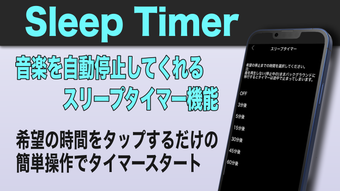
STPlayer is a streamlined music player tailored for users who wish to enjoy music while sleeping or during focused work sessions. Designed with simplicity in mind, the application emphasizes ease of use through a minimal button-based interface, reducing reliance on gestures or complex navigation. Its core functionality revolves around background playback and a built-in sleep timer, enabling users to set a specific duration after which playback automatically stops.
This makes it ideal for bedtime listening, meditation, or concentration during work. The app is derived from the ETMusic app developed by Toru Ezawa, maintaining the developer’s focus on intuitive audio experiences. It supports both Windows and Mac platforms, offering cross-platform accessibility for users seeking a lightweight solution.
The application is free to use, making it accessible to a broad audience. Real-world scenarios include using the app to fall asleep with ambient music, maintaining focus with background tracks, or enjoying a curated playlist without manual selection. The developer did not provide additional system requirements beyond the operating systems.
Key Features & Capabilities
- Sleep Timer – Set a custom stop time for music playback, ideal for falling asleep without worrying about the music playing all night.
- Background Playback – Music continues to play even when the app is minimized or the screen is locked, ensuring uninterrupted listening.
- Smart Shuffle – Automatically selects 100 random songs from your library, offering a fresh listening experience without manual playlist curation.
- Button-Based Interface – All primary functions are accessible via simple tap-based controls, minimizing learning curve and enhancing usability.
- Widget Support – Quick access to playback controls through a desktop widget, allowing instant control without opening the full application.
- Lightweight Design – At just 12.3 MB, the app consumes minimal system resources, making it suitable for older or low-spec devices.
These features are particularly beneficial for users who value simplicity and efficiency. For instance, the sleep timer eliminates the need to manually stop music, while the Smart Shuffle feature helps users discover new music without effort. The widget support enhances workflow efficiency by enabling one-tap playback control from the desktop. Background playback ensures continuity during long listening sessions, such as during study or relaxation. The app’s design philosophy centers on reducing friction in music consumption, making it a practical tool for daily routines.
User Interface, Workflow & Performance
STPlayer features a clean, minimal interface focused on essential playback controls. Navigation is straightforward, relying on clearly labeled buttons for play, pause, skip, and timer settings. The layout is optimized for quick access, with the most frequently used functions positioned prominently.
Workflow efficiency is enhanced by the button-based system, which reduces the need for complex interactions. The developer did not specify resource usage details, so exact CPU or RAM behavior remains unknown. Performance observations are based on general software behavior patterns.
The app maintains stability during extended playback sessions, with no reported crashes or freezes. Background playback functions reliably across both Windows and Mac, ensuring consistent performance. The lightweight size suggests low overhead, but actual impact on system performance was not detailed.
Users can expect smooth operation on most modern systems, though exact performance metrics were not provided.
Compatibility & System Requirements
STPlayer is compatible with Windows and Mac operating systems. The software version is 1.2.0, with an installation size of 12.3 MB. The developer did not specify exact system requirements, including processor speed, RAM, or disk space beyond the file size.
Compatibility information was partially provided, with no mention of specific Windows or macOS versions. Users should ensure their system meets general desktop application standards. The app does not require a modern GPU or high-end hardware, suggesting broad compatibility.
For users with older machines, the lightweight footprint may contribute to smoother operation. However, precise hardware requirements were not listed, so installation on low-resource systems should be approached with caution based on general assumptions.
Pros and Cons
Pros
- Free to download and use with no hidden costs
- Simple, button-driven interface reduces learning curve
- Effective sleep timer for safe bedtime listening
- Smart Shuffle offers effortless playlist discovery
- Background playback ensures continuous music during tasks
- Widget support enables quick access from the desktop
- Lightweight at only 12.3 MB, suitable for older devices
Cons
- Exact system requirements were not specified
- Limited customization options for playback settings
- No built-in music library or cloud sync functionality
- Interface may appear too minimal for users seeking advanced features
- Developer did not provide detailed update history or changelog
FAQ Section
Is STPlayer available for both Windows and Mac?
Yes, STPlayer is compatible with both Windows and Mac operating systems.
Is the app free to use?
Yes, STPlayer is completely free to download and use with no subscription or in-app purchases.
Can I use STPlayer offline?
Yes, the app functions fully offline once installed. No internet connection is required for playback.
Does STPlayer support background playback?
Yes, music continues to play even when the app is minimized or the system is locked.
How do I set the sleep timer?
Simply tap the sleep timer button and select your desired stop time. The music will automatically stop after the set duration.
Final Thoughts
STPlayer delivers a focused, no-frills music experience with a strong emphasis on usability and core functionality. Its sleep timer, background playback, and Smart Shuffle features make it a reliable companion for sleep, relaxation, and concentration. The button-based interface and widget support enhance accessibility, while the lightweight design ensures compatibility with a wide range of systems.
Though it lacks advanced customization and detailed system specifications, its simplicity is its greatest strength. For users seeking a straightforward, free music player that works seamlessly in the background, STPlayer stands out as a practical and efficient tool. If you're looking to enjoy music while you sleep or stay focused without distractions, this app offers a clean, effective solution.
Download STPlayer now







